


CentralDispatch Carrier Hub
3.852.00 Reviews
App Specs
- Version
- 51.0.0
- Updated On
- License
- Free
- Downloads
- 10,000+
- Developer
- Cox Automotive, Inc
- Categories
- Auto & Vehicles
- Platform
- Android
Screenshots
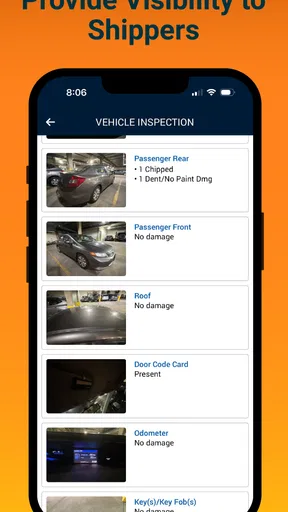
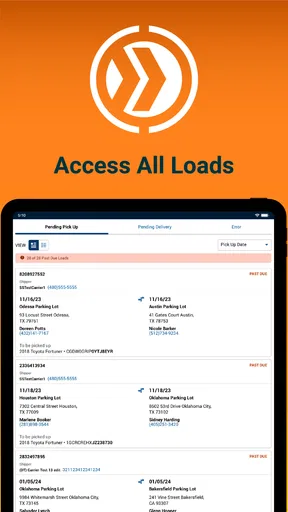
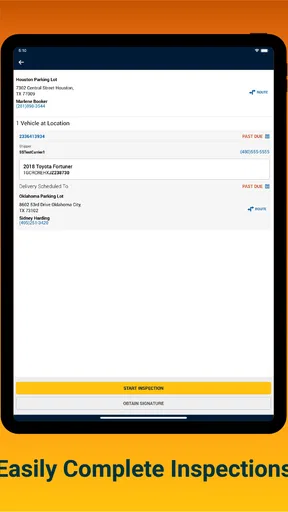
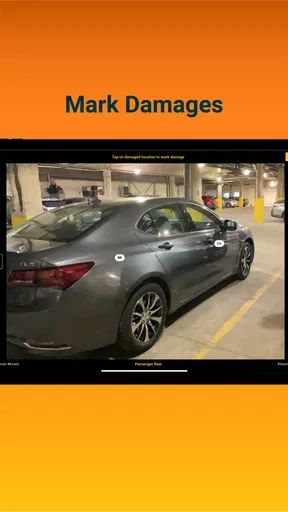
 Analysis by AppCompare
When I look at a work app such as CentralDispatch Carrier Hub, I judge it differently from a consumer app. The important question is not whether it feels entertaining or packed with extras. I want to know whether it helps a carrier inspect what needs attention, whether the workflow feels controlled, and whether I can understand my choices before I submit anything. This is a focused Auto & Vehicles app from Cox Automotive, Inc., built around Central Dispatch inspection work rather than general driving, navigation, or vehicle shopping.
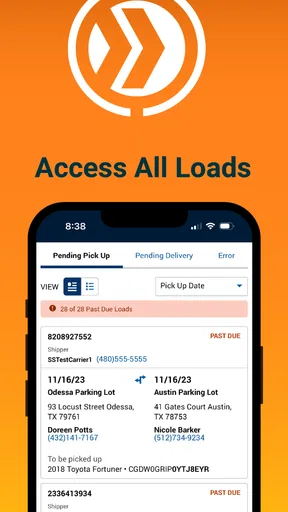
My first impression is that its narrow purpose is also its main advantage. A carrier who already works with Central Dispatch does not need another broad transportation dashboard competing for attention. The app is aimed at a specific job: checking inspection-related information in a mobile setting. That focus makes more sense for someone moving between vehicles, yards, offices, and pickup locations than a desktop-only process would.
At the same time, I would not recommend it casually to every driver or vehicle owner. The store summary identifies it as a Central Dispatch inspection tool, and the short description is simply CentralDispatch. That tells me this is a work companion for people connected to that ecosystem, not a standalone inspection guide for the public. If you are looking for repair advice, roadside assistance, fuel prices, or a way to sell a car, this is probably the wrong download.
How I judge its trust and day-to-day usefulness
I judge its trust and day-to-day usefulness by whether it supports a careful, repeatable inspection routine without encouraging shortcuts that can muddle a vehicle record. That means paying attention not just to what the app lets me do, but to how I prepare the phone and verify each step before moving on. From there, the next section looks at the practical checks I would make before relying on it in the field.
A focused tool for a specific professional relationship
The developer, Cox Automotive, Inc, gives the app a clear connection to the wider automotive-services space, but the practical value still depends on whether Central Dispatch is part of your normal work. I would treat that as the first decision point before installing it. The app is free, which removes a financial barrier, yet free does not automatically mean useful for everyone. Its purpose is specialized enough that the right account and work context matter more than the price.
In my view, the best audience is a carrier or transport professional who needs to deal with inspection information while away from a desk. A dispatcher or office worker may also find it useful when reviewing a vehicle-related task in the field, but the strongest case is for someone who needs a mobile inspection step as part of an existing Central Dispatch workflow. The app is less suitable for an independent consumer who only wants to document a personal vehicle’s condition.
That distinction is important for trust. A specialized app should not pretend to solve unrelated problems, and this one is easier to assess when I keep its role narrow. I would expect it to be most valuable when it reduces the need to switch between paper notes, a desktop browser, and informal messages. I would not assume it replaces every part of a carrier’s administrative process.
Worth Reading Before You Choose

EA SPORTS FC Mobile 26 Is a Bigger Football Game, but It Takes Time

Flipboard Shows What News Apps Must Do Beyond the Feed

Switching to Android Auto Means Rethinking Your Driving Routine

Google Calendar Makes a Crowded Week Easier to Manage

Ludo King Makes the Most of the Minutes Between Plans

Baby Panda World Brings Quick Play to Modern Phones, but Its Game Library Feels Busy
What the public signals tell me
The app has an average rating of 3.8 from roughly one hundred fifty ratings, with just over fifty written reviews. I read that as a mixed but usable public signal rather than a guarantee. It suggests that some people find the tool worthwhile while others have encountered enough friction to lower enthusiasm. For a work app, that matters because small issues during an inspection can be more frustrating than the same issue in a casual app.
Its reach is still relatively modest, with over ten thousand installs. I would not treat that as a measure of quality by itself, but it does reinforce the impression that this is a niche business tool rather than a mass-market automotive app. The current version is 51.0.0, and it runs on Android 8.0 or later. That compatibility is helpful for organizations using older devices, although I would still test it on the actual phone used in the field before making it part of a team routine.
The age rating is Everyone, which makes the app broadly accessible from a content perspective. That should not be confused with universal usefulness. The work context remains the deciding factor, and an Everyone rating does not tell me how much account access, vehicle information, or operational responsibility the app may involve during normal use.
Where verified controls matter most
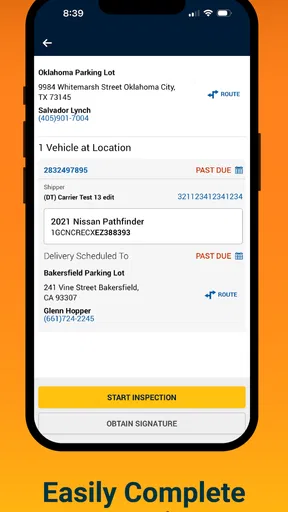
Because this is an inspection tool, I pay close attention to visible user choices. Before I confirm anything, I want the app to make the active vehicle, task, and inspection context clear. I also want a clear distinction between reviewing information and submitting an inspection result. Those are not the same action, and a mobile interface should make the difference obvious rather than relying on memory or tiny labels.
My practical advice is to slow down at the final review stage, especially when handling several vehicles in one location. A common field mistake is not a dramatic technical failure; it is attaching the right observation to the wrong vehicle or moving forward before checking the selected record. A focused inspection app can help with that workflow, but the user still needs to verify the context on screen before committing an update.
I would also look for ordinary account controls such as sign-in, sign-out, and any visible way to manage the active session. I cannot treat the presence of a login as proof of strong protection, nor can I assume that a particular security option exists unless it is shown in the app. What I can say is that account awareness should be part of a careful routine: use the correct work account, avoid leaving a shared phone open, and sign out when the device is not under your control.
The safest habit is to verify the vehicle context immediately before submitting an inspection. That advice is more valuable here than chasing speed. A few extra seconds can prevent a recordkeeping problem that may take much longer to correct later.
Data-sensitive moments in a normal inspection
An inspection workflow can involve sensitive operational information even when the app looks simple. The sensitive moment is not only the final submission. It begins when I open a work record, select a vehicle, review condition details, or use the phone in a location where other people can see the screen. I would avoid displaying an active record unnecessarily in public areas and would lock the device whenever I step away.
I also would not copy inspection details into personal notes or send screenshots through informal channels unless the company’s process explicitly allows it. That is a useful boundary because screenshots can preserve more context than intended, including identifiers or work information visible around the main detail. The app may be convenient precisely because it centralizes the task; duplicating the same information elsewhere can weaken that advantage.
Permissions deserve the same careful treatment. I would review the permission prompts as they appear and ask whether each request makes sense for the action I am trying to perform. I would not grant access automatically just because the app is free or connected to a familiar company. If a permission is optional, declining it may be the better privacy choice. If a required function depends on it, I would make that decision consciously and understand what part of the workflow may be affected.
This is also where I would avoid making assumptions about data practices. The app’s category and purpose do not, by themselves, prove what information is collected, how long it is retained, or who can view it. I would rely on the app’s visible notices, permission dialogs, account screens, and the organization’s own instructions rather than guessing. That is a healthier way to evaluate trust than treating a recognizable developer name as a complete privacy explanation.
A realistic field scenario
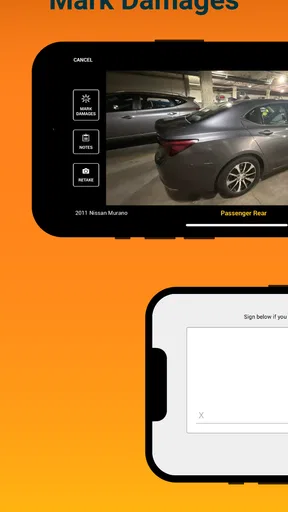
Imagine I am at a pickup location with several vehicles waiting for transport. I open the app to handle an inspection-related task while moving between them. My first step would be to identify the correct work record before looking at the vehicle. I would then compare the visible vehicle details with the physical vehicle in front of me, complete the inspection step, and pause to review the result before submitting.
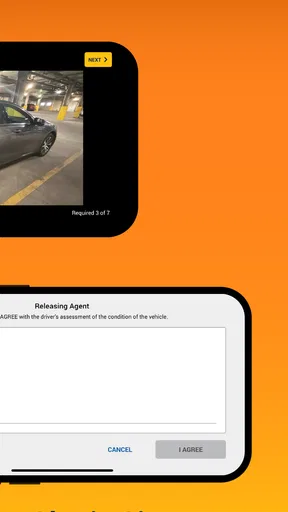
If the location is busy, I would avoid balancing the phone in one hand while rushing through the process. I would move to a safer spot, keep the screen private, and use a short checklist outside the app if I need to remember observations. The important point is to use the app as the controlled record, not as a substitute for careful identification. After submission, I would check for a visible completion state or confirmation before assuming the task is finished.
If something looks wrong, I would not repeatedly submit the same action in the hope that one attempt worked. I would first check the selected record, the connection, and the app’s visible status. Repeated attempts can create confusion, especially when the user cannot immediately tell whether the first submission succeeded. If the app does not make the state clear, I would document the time and vehicle context through the approved work channel rather than improvising a personal workaround.
What it does well compared with usual alternatives
The usual alternative to a dedicated inspection tool is a mixture of a desktop system, paper forms, photographs, phone calls, and messages. That approach can work, but it creates more opportunities for transcription errors and delayed updates. A mobile Central Dispatch companion has a natural advantage when the person doing the inspection is not sitting at a desk. The information can be handled closer to the vehicle and closer to the moment of inspection.
Compared with a generic notes app, a specialized tool should provide better work context because it is designed around the Central Dispatch process. A notes app may be faster for free-form observations, but it leaves the user responsible for naming files, matching vehicles, and transferring details later. I would use notes only as a temporary aid, not as the primary record, unless the employer’s procedure says otherwise.
Compared with a general vehicle inspection app, this product’s value is not broad functionality. Its value is alignment with a particular dispatch environment. That is a strength for the right carrier and a limitation for everyone else. A generic inspection app may be better if I need customizable forms for personal vehicles, fleet maintenance, or regulatory checks outside Central Dispatch.
I also see a trade-off between specialization and independence. A focused app can reduce unnecessary choices, but it may feel restrictive if my work requires several systems at once. I would rather have a dependable, narrow workflow than a crowded app full of unrelated tools, yet I would not expect this product alone to replace scheduling, navigation, billing, communication, or full fleet management.
Small workflow choices that make a difference
My first useful tip is to establish a repeatable order: identify the record, match it to the physical vehicle, inspect, review, and then submit. Doing those steps in the same sequence reduces the chance of confusing two nearby vehicles. This is especially important when several similar cars are present and the work is being done under time pressure.
My second tip is to separate observation from confirmation. I would take a moment to inspect the vehicle carefully before tapping through the final stage. Speed is helpful only when the selected record is correct. If the interface encourages quick progression, the user should deliberately create that review pause rather than assuming the last screen is merely informational.
My third tip is to treat shared devices as a special case. If a phone or tablet is used by multiple people, I would confirm which account is active before starting and make sure the next user cannot accidentally continue the previous session. I would also avoid saving work information in personal screenshots or unrelated cloud notes. These are simple choices, but they give the user more control over where inspection details appear.
A fourth useful habit is to test the workflow during a quiet job before relying on it during a busy pickup. I would learn where the selected vehicle is shown, how the app signals completion, and what happens when I pause or leave the screen. That kind of familiarization is more practical than discovering the interface while several vehicles and people are waiting.
Who should use it, and who should skip it
I would recommend trying it if Central Dispatch is already part of your carrier work and you need an inspection step that travels with you. The free price makes a trial easier, and the focused purpose should appeal to users who prefer a direct tool instead of a broad automotive platform. It is also a reasonable candidate for teams that want field staff to work closer to the vehicle rather than relying entirely on office staff.
I would skip it if I am a private vehicle owner searching for a general inspection checklist. I would also look elsewhere if I need maintenance reminders, repair estimates, trip planning, fuel tracking, or a customizable fleet database. Those needs call for different tools, and installing a Central Dispatch companion would add clutter without solving the actual problem.
I would be cautious about adopting it across a large operation without a short internal trial. The rating is not poor, but it is not strong enough for me to assume that every workflow will be smooth for every user. I would test the phones used by drivers, confirm that the required Android version is available, and ask staff to report where they hesitate or lose confidence. A work app succeeds when the whole process is clear, not merely when it opens.
My cautious verdict
After looking at it as a professional tool, I see CentralDispatch Carrier Hub as a purpose-built option for a specific group rather than a universal automotive recommendation. Its strongest quality is focus: it gives Central Dispatch users a mobile place to handle inspection work. Its main weakness is the same focus, because people outside that workflow have little reason to choose it over a general inspection or fleet app.
I also would not use the developer, rating, install count, or Everyone label as a substitute for checking the app’s visible controls. Trust should come from deliberate use: reviewing permissions, confirming the active account, protecting the screen in public, matching every record to the correct vehicle, and checking the result before moving on. Those habits remain important even when the app is free and connected to an established automotive company.
For the right carrier, I think it is worth testing because a mobile inspection workflow can be more practical than paper or delayed desktop entry. For everyone else, I would choose a tool designed for the actual job rather than downloading this one simply because it sits in the Auto & Vehicles category. My final view is positive but measured: use it when Central Dispatch is already central to your work, and keep control of every account, permission, and submission along the way.
Pros
- Centralizes load offers
- assignments
- and delivery details in one app.
- Helps carriers respond to dispatch requests without constant phone calls.
- Provides quick access to shipment information while on the road.
- Can improve communication between drivers and dispatch teams.
- Useful for keeping dispatch-related tasks organized in one place.
Cons
- Requires a carrier account and may not work without company authorization.
- Some features depend on a stable mobile data connection.
- Frequent notifications may become distracting during busy routes.
- The interface may feel less useful for independent owner-operators.
- Performance and available tools can vary by dispatch company.
FAQs for CentralDispatch Carrier Hub
What is CentralDispatch Carrier Hub used for?
CentralDispatch Carrier Hub is designed for auto transport carriers and drivers who need to manage vehicle shipping assignments while on the move. It can help users review available loads, organize dispatch information, communicate with customers or dispatchers, and keep important shipment details accessible from a mobile device. It is mainly intended for professionals already working with the CentralDispatch transportation network.
Do I need a CentralDispatch account to use the app?
Yes, access to the main carrier features generally requires an active CentralDispatch account and appropriate carrier credentials. The app is not intended to function as a public load board for casual users. Depending on your role, company setup, or account permissions, some tools may be unavailable until your carrier profile is approved, linked correctly, or given access by an administrator.
Can carriers manage vehicle transport loads from their phone?
The app is built to make common carrier tasks more convenient away from a desktop computer. After signing in, users may be able to review shipment information, check assigned work, update relevant status details, and stay connected with dispatch operations. The exact options can vary according to account permissions and current platform support, so it should be viewed as a mobile companion to the CentralDispatch service.
Does CentralDispatch Carrier Hub require an internet connection?
An internet connection is normally necessary for signing in, retrieving current load information, sending updates, and synchronizing changes with the CentralDispatch system. Mobile data or Wi-Fi may be used, although connection quality can affect loading times and communication reliability. If you frequently work in areas with weak coverage, it is sensible to review essential shipment details before traveling and avoid assuming that every feature works offline.
Is CentralDispatch Carrier Hub suitable for every type of transport business?
CentralDispatch Carrier Hub is most useful for carriers, dispatchers, and drivers involved in vehicle transportation who already rely on the CentralDispatch marketplace or workflow. It may not be suitable for private vehicle owners, general freight companies, or businesses searching for a universal logistics management system. Before downloading, confirm that your company uses CentralDispatch and that your account type supports the mobile features you need.


